Menu Aksesibiliti ×
Saiz Tulisan
Warna Kontras
Tulisan Jelas (Arial)
Tetapan Asal
Logo Lembaga Kemajuan Wilayah Kedah (KEDA)

Lembaga Kemajuan Wilayah Kedah (KEDA)

Multi Language [EN] | [MY]
Soalan Lazim
Mengenai KEDA

Dasar Privasi

Dasar PrivasiDasar KeselamatanPenafianHakcipta Terpelihara © 2026-09-10 16:50:40 KEDAPortal MyGovMaklumat CIO / CDO Agensi KEDAData TerbukaKebebasan Maklumat
MyMesyuarat Peta Laman
Penerbitan Rasmi KEDASoalan Lazim
Pengumuman Rasmi
Berita Terkini KEDA
Piagam Pelanggan
Perkhidmatan Atas TalianArkib ElektronikTender & SebuthargaPenyertaan Awam
Kemaskini Terakhir: 2026-09-10 16:50:40
Hubungi Kami


.

.

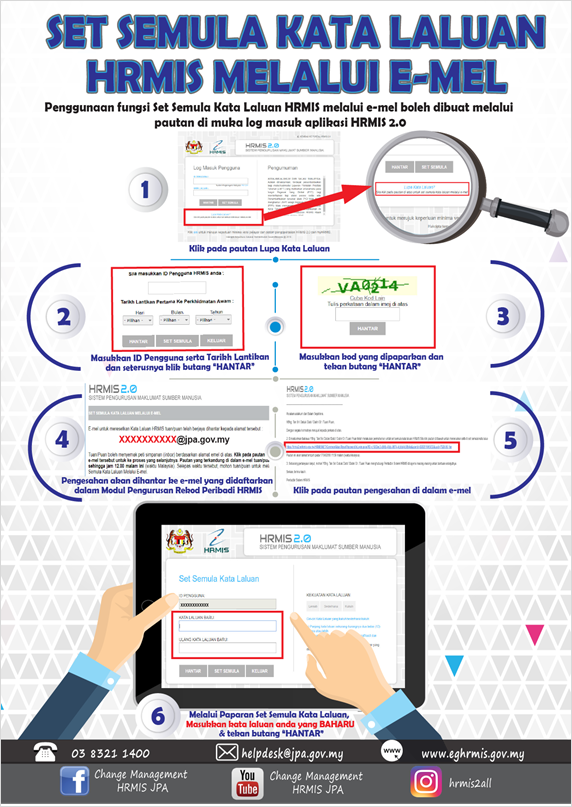
HRMIS Password Reset via Email

Users can reset their HRMIS password via the Reset Password function available on the HRMIS 2.0 login page.
Password Reset Steps
1. Click the “Forgot Password” link on the HRMIS 2.0 login page.
2. Enter your User ID as well as Appointment Date and Confirmation Date (if applicable), then click “SUBMIT”.
3. Enter the displayed security code (captcha) and click “SUBMIT”.
4. verification message will be sent to the email address registered in the HRMIS Personal Record Management Module.
5. Open the email and click the verification link provided.
6. On the Password Reset screen, enter your new password and click “SUBMIT” to confirm the changes.

Important Notes
Ensure that the email address registered in HRMIS is active and valid.
If you do not receive the verification email, please check your Spam / Junk folder.
The new password must comply with the security requirements set by the system.

Logo Lembaga Kemajuan Wilayah Kedah (KEDA)
×
Imej ahli lembaga pengarah